With the Rush Hour update released on September 22, 2026, Valve added a new game mode called Rush to Counter-Strike 2. Rush is a fast-paced 3v3 mode played through queueing. Instead of the classic bomb plant-and-defuse format, the two teams fight in a series of small arenas and try to reach the enemy's castle. In this guide, we explain the mode's rules, the arenas and the gameplay changes that came with the same update.
How do you play Rush mode?
According to Valve's description, the basic rules of Rush are as follows:
- A match consists of a series of randomly selected battle arenas. Because the arenas are chosen anew for every match, no two matches are the same.
- Each round is based on controlling the tower in the arena. To win the round, you need to hold the tower when you eliminate the enemy team or when time runs out.
- As you win rounds, you advance through the arenas. The goal is to reach the enemy castle and capture it. The team that captures the castle wins the match.
- Your budget and time are limited. Using money and time well matters more in this mode than in classic competitive.
The matches you win in Rush are also tracked on the Rush friends leaderboard.
Rush arenas
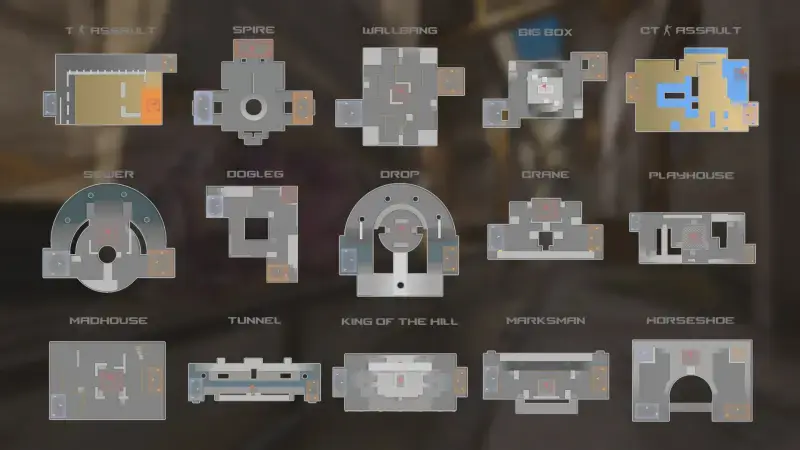
Valve's promotional image shows 15 arenas: T Assault, Spire, Wallbang, Big Box, CT Assault, Sewer, Dogleg, Drop, Crane, Playhouse, Madhouse, Tunnel, King of the Hill, Marksman and Horseshoe. Some arenas are designed around long sight lines, others around corner peeking and close contact. That is why it pays to choose your weapon based on the structure of the arena instead of buying the same gun everywhere.
Current Rush settings
Valve fine-tuned the mode from the first days. In the September 23 patch, the post-elimination countdown in the final rooms and in Convoy was increased from 7 seconds to 14 seconds. If an entire team dies from suicide, team killing or disconnection, this countdown does not start. Warmup, freeze time and tactical timeout durations were shortened. On September 24, a better explanation of the rules was added to the loading screen, and the rules for being kicked from the game over team damage were changed. In the following weeks, gap and collision fixes were made in many Rush rooms.
Silent reload
The Rush Hour update also brought a change that affects all modes: if you hold down the reload key, you reload silently. There is a cost: a silent reload takes much longer. In addition, closing the scope on a sniper rifle no longer makes a sound. Valve closed loopholes in this system in later patches. Bugs such as a slightly faster silent reload by first tapping and then holding the key, and firing shotguns faster than normal, were fixed. We covered the overall impact of the weapon changes in our CS2 weapon meta guide.
New map selection in Premier
In Premier, the map selection process has moved from banning to picking. The new order is as follows:
| Step | Who | What they do |
|---|---|---|
| 1 | Team 1 | Picks 1 map |
| 2 | Team 2 | Picks 2 maps |
| 3 | Team 1 | Picks the last map |
| 4 | System | One of the four maps is chosen at random and the match starts |
Valve's reasoning is this: players who put effort into a map should get the chance to play that map more often. You can find the other differences between Premier and Competitive in our CS2 rank guide.
New crosshair system
With the same update, crosshairs became resolution-independent and a new Crosshair/Scopes tab was added to Settings. Thickness and length are now entered directly in pixels. For example, if you want a thickness of 1 pixel, a length of 8 pixels and a gap of 4 pixels, you just need to enter the values 1, 8 and 4. When you change your resolution, the system scales the crosshair proportionally by itself. The default crosshair became "Dynamic Quad," which shows weapon accuracy better.
The following were added in the late September and October patches:
- An outline color option around the crosshair
- New "Static Quadrant" and fixed square styles
- A half-outline option
- A grenade crosshair during freeze time (hold the grenade attack key for instant smoke throws)
- Negative gap in the classic dynamic style
- A new crosshair share code format (scope dot size and color are also included in the code)
Because the share code format has changed, it is a good idea to re-check your old codes in the new system. For ready-made crosshairs and all commands, you can check out our CS2 crosshair settings guide.
What else changed in the October patches?
- October 2: Agents wear the gloves they equip in the photo booth and in the buy menu; the lighting on the Warehouse map was improved.
- October 5: Buttons for managing downloaded Workshop maps were added to the Play menu.
- October 8: A ping icon was added for dropped defuse kits; the AUG reload time was shortened by half a second.
- October 14: A download bar and click-and-drag camera were added to the demo/replay viewer; free and follow cameras can be used while the demo is paused. AUG reload animations were adapted to the new timing, and Vulkan stability was improved.
Frequently asked questions
How many players are in CS2 Rush?
Rush is a 3v3 mode in which two teams play with three players each.
How do you win a round in Rush?
The team that controls the tower when it eliminates the enemy team or when time runs out wins the round. The team that captures the enemy's castle wins the match.
How do you do a silent reload?
You just need to hold down the reload key. The magazine is changed silently, but it takes noticeably longer than normal.
Source: Valve's official Counter-Strike 2 announcements and update notes (September 22 – October 14, 2026).