Onimusha: Way of the Sword brings Capcom's series, which has not seen a new main entry for years, back to the stage. The game's official release is now imminent, and the most fundamental question on PC players' minds is this: How will this title run on my computer? The benchmark data at hand gives a very clear answer to that question; on the smoothness side, players will be more than satisfied, but the same comfort cannot be said for the visual side. Below, we examine both the hardware table and what this table means in practice in detail.
Test Setup and Benchmark Conditions
The strongest aspect of the review is the official tool that makes pre-release testing possible. Capcom released a benchmark tool for the PC version of the game, allowing both the press and players to try it on their own systems in advance. This approach is actually quite valuable for the PC platform: players can see which frame rates they will reach at which settings before spending money. Especially today, when the numbers on system requirements pages often differ from real-world performance, the existence of such a tool is reassuring.
Tests were carried out on an AMD Ryzen 9 7950X3D processor. The system had 32 GB of DDR5 memory running at 6000 MHz and the Windows 10 64-bit operating system. On the driver side, GeForce 616.64 for NVIDIA and Radeon Adrenalin Edition 26.8.1 for AMD were used. This means that not a single card, but a wide range of cards from different budgets and generations were tested under the same conditions.
The graphics card list confirms this breadth as well. From AMD, the Radeon RX 6900XT, RX 7900XTX and RX 9070XT; from NVIDIA, the RTX 2080Ti, RTX 3080, RTX 4090, RTX 5080 and RTX 5090 were tested. This selection is very useful for seeing how the game behaves on both older-generation cards and the very top models. In particular, including a card that has now aged like the RTX 2080Ti better represents the real-world player base. Before moving on to the results, looking at the settings and technology support the game offers is necessary to interpret the numbers correctly.
Graphics Settings and Technology Support
Capcom has not been stingy with settings in the PC version. Players can separately change the quality of textures, meshes, sky, foliage and shadows. Apart from these, there is also a Ray Tracing setting that improves the game's overall lighting. In other words, there is a wide room for maneuver for players who want to fine-tune both visual fidelity and performance.
On the upscaling technology side, both major manufacturers are covered. NVIDIA DLSS 4.5 is offered together with MFG (Multi Frame Generation) support; on the AMD side, FSR 3.1 is included. This combination is a serious plus, especially for players with high-refresh-rate monitors. Because when frame generation technologies are used correctly, it is possible to raise frame rates significantly without compromising image quality too much.
The fact that the settings menu is this detailed also gives an idea about the game's scalability. Giving control to the player instead of a closed set of settings makes the game playable even on low-spec systems. However, the same flexibility also raises the question of why the visual side does not push the limits. Although increasing the detail level lowers performance, the picture that ultimately emerges shows the ceiling of the game's engine.
Performance Table by Resolution
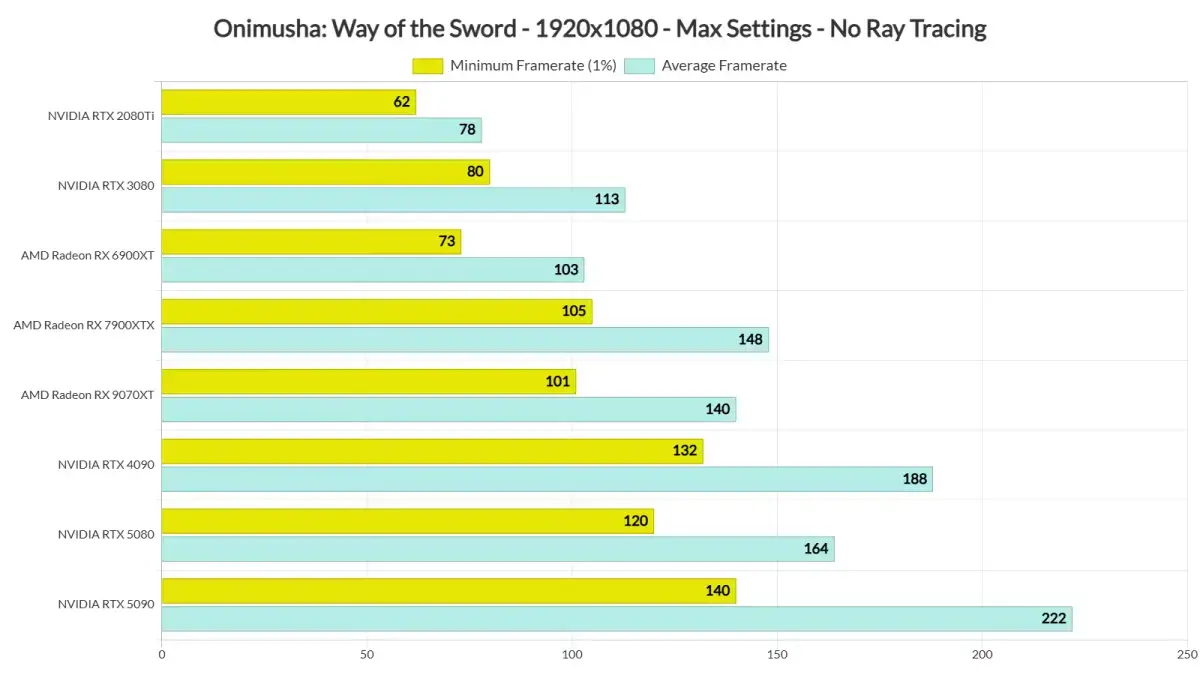
The numbers show that serious work was done on the optimization side. When tested at 1080p resolution with maximum settings, the NVIDIA GeForce RTX 5090 was limited this time not by the graphics card but by the Ryzen 9 7950X3D. Despite this, the average frame rate exceeded 220 FPS. All cards tested at this resolution produced results above 60 FPS; even the RTX 2080Ti reached an average of 78 FPS.
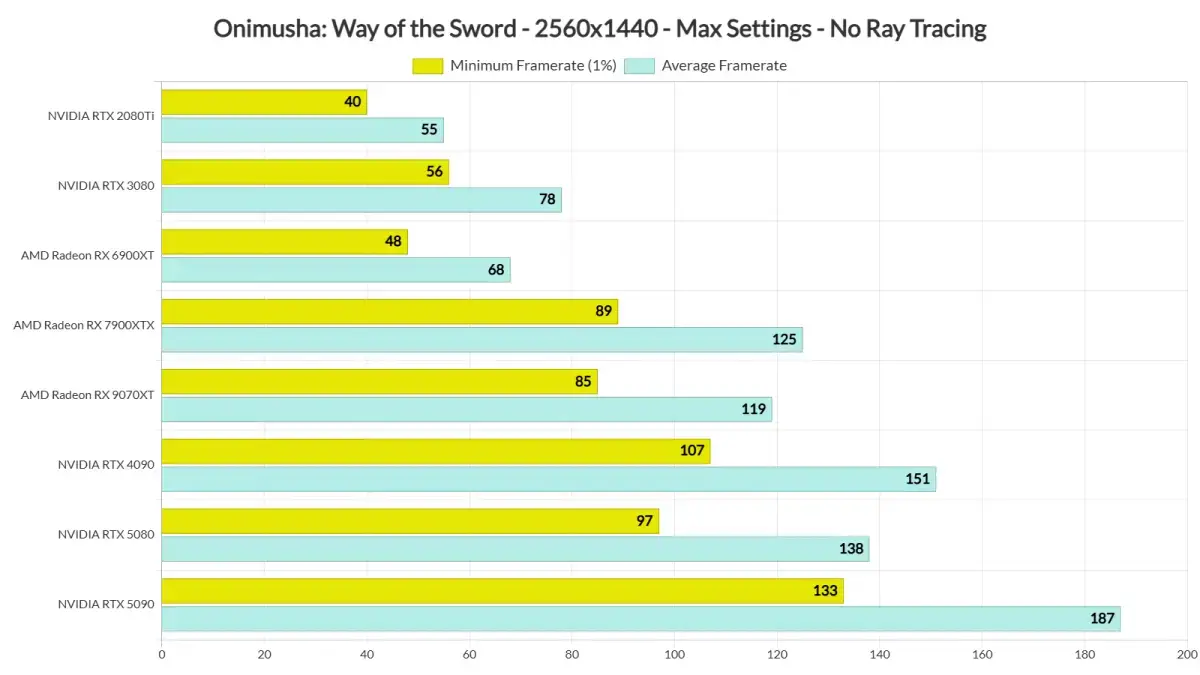
When we move up to 1440p, the picture is still very comfortable. The five strongest cards never dropped below 60 FPS throughout the benchmark. The RTX 3080 was also able to offer a smooth experience with a G-Sync-supported monitor. The AMD Radeon RX 6900XT, on the other hand, averaged 68 FPS, but there were moments when it dipped below 50 FPS from time to time. Such drops remind us that the average value alone is not enough; fluctuations in frame timing can be felt.
- 1080p / Maximum settings: RTX 5090 hits 220+ FPS despite being CPU-bound. All cards in the list are above 60 FPS; the weakest link, the RTX 2080Ti, averages 78 FPS.
- 1440p / Maximum settings: The five strongest cards are comfortably above 60 FPS. RTX 3080 is smooth with G-Sync. RX 6900XT averages 68 FPS, but dips below 50 FPS in places.
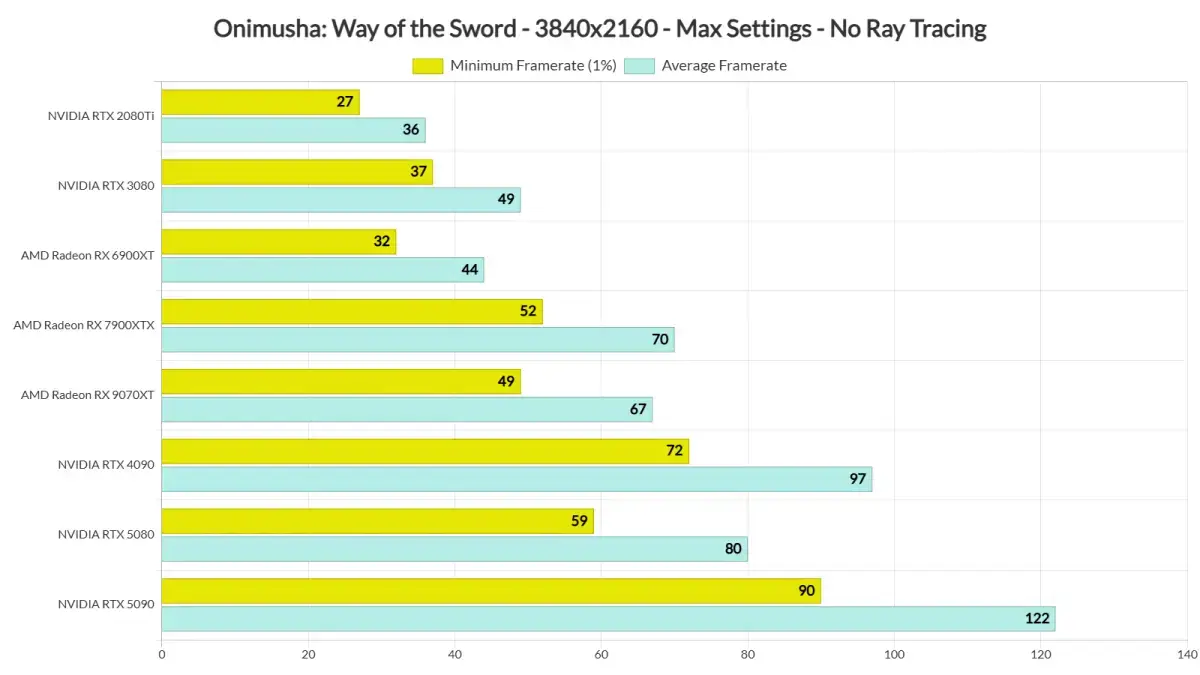
- Native 4K / Maximum settings: RTX 4090, RTX 5080 and RTX 5090 can stay above 60 FPS. RX 9070XT and RX 7900XTX offer a smooth experience with a FreeSync monitor.
On the native 4K side, things become a bit more serious, but still not frightening. The RTX 4090, RTX 5080 and RTX 5090 can stay above 60 FPS at maximum settings. On the AMD side, the RX 9070XT and RX 7900XTX provide a smooth experience when a FreeSync monitor is used. In other words, it would not be correct to say that a player who wants to play in 4K absolutely needs a top-of-the-line card.
The most striking aspect of this table is that the game remains playable at every resolution. The 'even 40 FPS with the top card' picture seen in many newly released PC versions is not present here. On the contrary, the fact that a relatively old card like the RTX 2080Ti averages 78 FPS at 1080p shows how serious the optimization is. This makes the game accessible to a large player base that is not thinking about upgrading their hardware anytime soon.
Visual Quality: Does the RE Engine Meet Expectations?
Despite this success on the performance side, visual quality does not create the same excitement. The game runs on Capcom's own RE Engine; however, it cannot approach the visuals of recent Resident Evil games. It would not be wrong to say that it generally looks good, but you do not have to stare for a long time to notice the shortcomings. In some scenes, the level of detail and environmental richness fall below expectations, since we know what the engine is actually capable of.
The Ray Tracing setting deepens this disappointment as well. The setting promises to improve the game's lighting; however, the visual difference that emerges in practice is quite small. Even in dark and shadowy environments, it is difficult to notice the improvements RT provides. This means that despite the setting's existence, players cannot find a real reason to turn it on.
The most annoying part is that there is no Path Tracing support at all. Capcom's decision not to implement this technology seems to have left part of the game's visual potential on the table. Properly implemented ray tracing could have made a serious difference in an atmospheric action game like this. Therefore, the visual side tells the exact opposite story of the performance side: the engineering is solid, while the artistic courage is more cautious.
At this point, the question players need to ask themselves is this: Visual spectacle or smoothness? In a title that cannot offer both at the highest level at the same time, Capcom seems to have made its choice in favor of the latter. This is a choice that will not please everyone; but the game running smoothly across a wide range of hardware is a direct result of that choice.
Stuttering Issue and the Denuvo Factor
Stuttering, one of the biggest headaches of modern PC games, does not show itself here. Not a single stutter was experienced in either the PC demo or the benchmark tool. The experience felt smooth from start to finish. This means that a problem frequently encountered in PC ports in recent years and one that drives players crazy is completely absent here.
This needs to be underlined because the game uses Denuvo protection technology. Denuvo's impact on performance has long been a subject of debate, and it is claimed to bring extra overhead in many titles. Here, however, no serious issue has been observed despite the protection technology. Of course, this does not mean Denuvo is ineffective; it only shows that in this specific game, a situation that would bother players did not arise.
Stuttering caused by shader compilation is among the top complaints of PC players recently. Sudden frozen frames or micro-stutters in a game's first hours can ruin the experience no matter how powerful your system is. The fact that Onimusha: Way of the Sword does not fall into this trap is one of the most concrete proofs that the technical team did its job well.
Conclusion: Who Is This Game For?
To sum up, Onimusha: Way of the Sword is a title that runs extremely well on PC. It does not require a high-end computer, does not make you fight with stutters, and remains playable across a wide range of hardware. On the other hand, its visuals do not push the boundaries of PC gaming; they look good, but they are not the kind to blow you away. The fact that Capcom did not implement Path Tracing is a separate disappointment.
The practical conclusion here is this: If you are looking for a well-optimized, smooth and trouble-free action experience, the game will satisfy you. If you are expecting a visual spectacle that pushes your system to its limits and brings every new-generation card to its knees, it would be wise to lower your expectations a notch. In either case, it must be accepted that the game rests on a technically solid foundation.
The smartest move you can make before a purchase decision is to run the official benchmark tool Capcom released on your own system. That way, you can clearly see in advance at which resolution, with which settings, and with which upscaling technology you will play. Especially for players targeting 1440p and 4K, this test will also show how critical the synchronization technology offered by the monitor (G-Sync or FreeSync) is. In short, the game stands out not for its visual claims, but for its smoothness and stability; and that is more than enough justification for many players.