
Hardware benchmarking tools are often updated quietly: the version number goes up, a few tests are added, and the matter is closed. With Geekbench 7, however, things unfolded differently this time. Primate Labs rebuilt the test suite not just with a new version label, but from scratch along with the logic of multi-core scoring, the focus of GPU tests, and the list of supported APIs. These changes create a more consistent reference point for the first time for hardware teams trying to measure AI workloads and technology managers making purchasing decisions. Below, we cover the suite's standout new features, why they matter, and the practical issues that have emerged on the testing side.
CUDA support: Nvidia GPUs are now measured with the production pipeline's API
The most talked-about new feature in Geekbench 7 is CUDA joining the supported APIs. Until now, the suite used OpenCL, Vulkan, and Metal APIs in GPU tests; Nvidia was not on that list. Now an Nvidia GPU can be measured with the same API stack that actually runs heavy AI workloads. This step, which Primate Labs says users have requested for years, aims to narrow the gap between on-paper performance claims and real application behavior. For a benchmarking tool to follow the path the hardware it measures uses in everyday workflows is a critical detail for how interpretable the results are.
The value of this support goes far beyond adding one item to a list. In the source review, CUDA support is described as a turning point in cross-platform benchmarking: for the first time, a single tool can measure an Nvidia GPU with the API stack that runs AI workloads in production environments. Independent software vendors and silicon teams can look to a single shared reference instead of trying to guess different vendors' marketing numbers with three separate benchmarking tools. Still, the real signal is not CUDA itself; it is benchmarking tools' effort to keep up with AI workloads moving to everyday devices so quickly.
Geekbench 7 also comes with a companion tool called Geekbench AI. This tool runs 10 AI workloads across three data types: Single Precision, Half Precision, and Quantized. Users can test the CPU, GPU, or the device's own NPU separately; regardless of the framework the hardware supports (from Core ML to QNN), results can be compared across Android, iOS, Windows, macOS, and Linux through a single browser. Being able to measure the NPU side separately is especially important, because the numbers vendors provide under the heading "NPU performance" have so far remained independent and hard-to-verify claims.
Multi-core score: the unobtrusive but most critical fix
The suite's most technical and also most impactful change is in the multi-core test. Previous versions forced every workload into multithreaded mode regardless of how the real application behaved. This approach distorted scores and gave users no meaningful information, because no real application uses all cores continuously and equally. Geekbench 7 reverses this logic: a workload runs in multithreaded mode only if the task it models actually runs multithreaded in the real world.
The most visible result of this rule is that the HTML5 Browser test has been removed entirely from the multi-core suite. The reason is quite clear: browsers in practice run single-threaded or lightly threaded, so keeping this test in the multi-core score made a misleading contribution. The resulting picture is a score that reflects what a device does in real workloads, not the theoretical maximum a synthetic test could draw from all available cores.
For teams making hardware purchasing decisions, this fix means the numbers become reliable again. When comparing two laptops, deciding with a crude equation like "more cores, higher score" was a common mistake. The new methodology makes visible through the score why a device with many cores but weak single-core performance feels slow in everyday tasks. In short, the test begins measuring hardware's behavior on the desk, not in the advertising brochure.
CPU tests shift to the real workloads of everyday use
The new media workloads focus on what an ordinary user uses a computer for most during the day. Geekbench 7 models the screen-sharing scenario in video conferencing by encoding screen-sharing videos with the AV1 codec. It imitates voice note and podcast apps by compressing music and speech audio with the Opus codec. In addition to audio and video decoding, it generates live captions through OpenAI's Whisper speech recognition model, representing automatic captioned video playback. A new Game Physics workload running on the Jolt Physics engine used in modern games has also been added to the suite.
The photo side has not been neglected either. The Photo Editor workload has gained a richer set of real-world edits; Photo Library now imports and processes JPEG XL and DNG formats. These choices are not coincidental: what a user who constantly edits photos, records audio, and joins meetings on their phone or computer expects from a CPU roughly consists of this list.
- Encoding screen-sharing video with AV1 (video conferencing scenario)
- Compressing music and speech audio with Opus (voice note and podcast apps)
- Audio/video decoding and generating live captions with Whisper
- Game Physics workload running on the Jolt Physics engine
- Expanded real-world edits in Photo Editor
- JPEG XL and DNG import and processing in Photo Library
GPU side focuses on AI and content creation
The focus of GPU tests has increasingly shifted to two areas that define how GPUs are actually used: machine learning and content creation. The new ML tests model social media apps by tracking faces and applying real-time filters. The machine-learning image upscaling test represents super-resolution features in content creation tools. The video background blur test measures virtual backgrounds in video conferencing. These three scenarios make up a significant portion of the work loaded onto GPUs in recent years.
Alongside these, RAW image processing, LUT-based color grading, path tracing, and fluid simulation have been added. Path tracing and fluid simulation are especially demanding workloads used in professional visual production and game development. LUT-based color grading, meanwhile, is a standard part of video editing workflows. The list as a whole shows that the GPU is no longer just a unit producing game frame rates; it sits at the center of the production pipeline.
- Face tracking and real-time filters (social media apps)
- Machine-learning image upscaling (super-resolution in content creation)
- Video background blur (virtual backgrounds)
- RAW image processing and LUT-based color grading
- Path tracing and fluid simulation
Data sets grew, platform support expanded
Data sets have also been expanded across the board to match how devices are used today. The File Compression test now covers a broader mix of source code, object code, and text document archives. The PDF Viewer test processes a range from park maps to technical documents and academic papers. Developer and image processing workloads have also been expanded with new assets and additional formats. The common goal of these changes is to reflect the variety a device will encounter instead of producing a score based on a single narrow scenario.
Geekbench 7 runs on Android, iOS, Windows, macOS, and Linux, remains free for personal use, and adds a Pro tier offered at 20% off until August 6. The release review was published by Jon Peddie Research; the publisher's masthead and the information in its "About us" section indicate the organization is based in Tiburon, California. So behind the suite there is both broad platform support and a tradition of independent review.
Testing on four different systems: a consistency problem
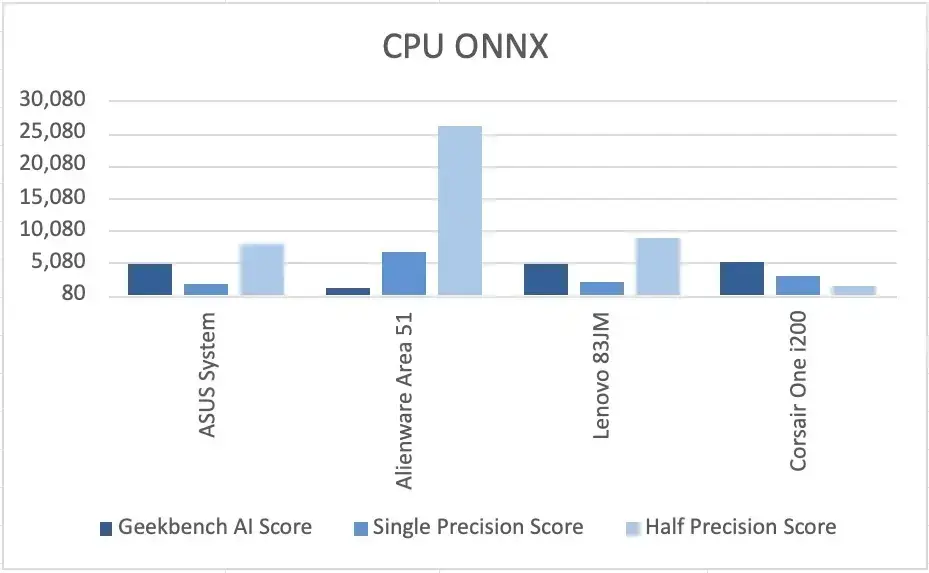
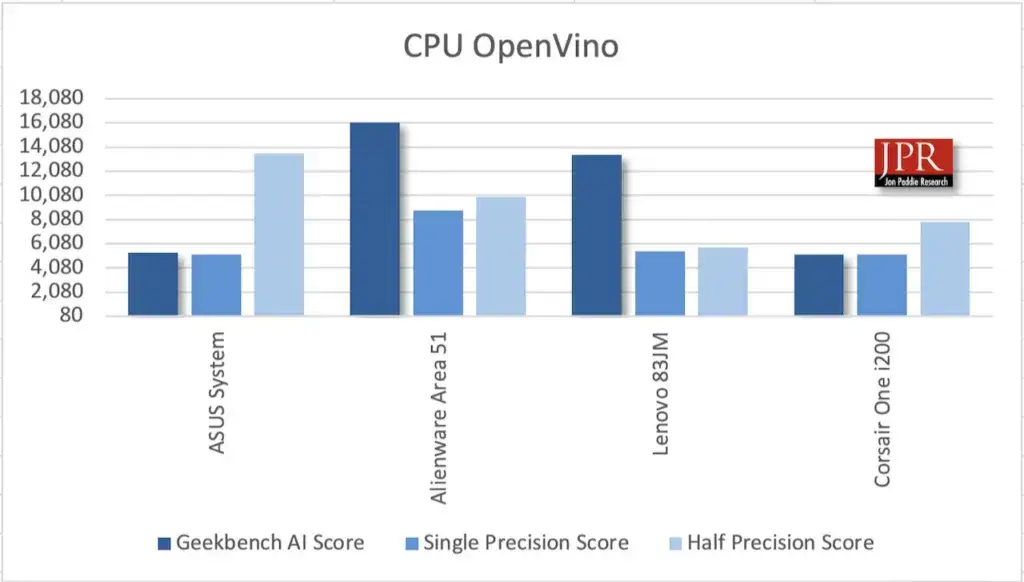
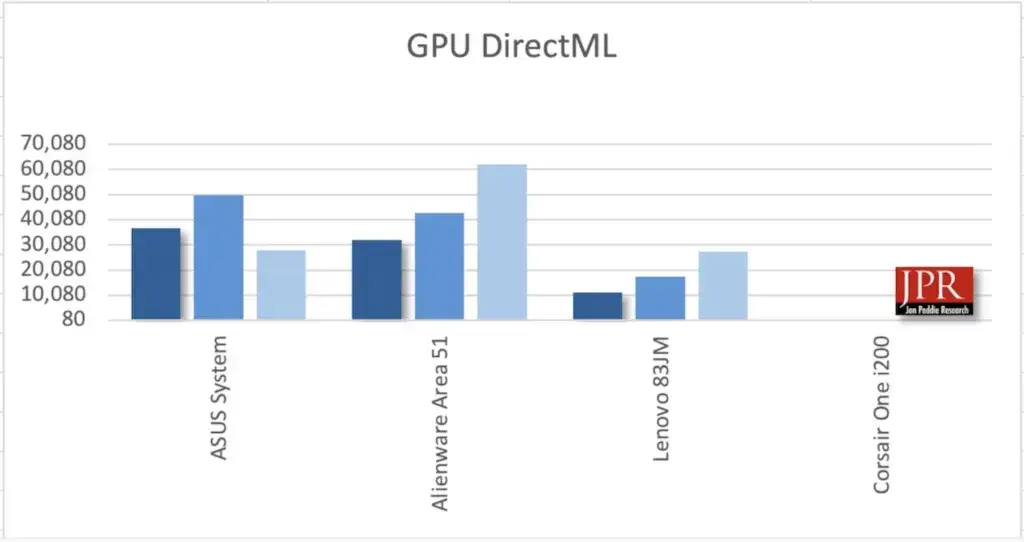
In the review, the benchmark was run on very different machines: Asus System, Alienware Area 51, Lenovo 83JM, and Corsair One i200. Some of the results are less orderly than expected. GPU tests that ran consistently on all four systems could not be obtained, whereas CPU tests gave consistent results. So although the newly introduced metrics within the suite work soundly, framework and driver combinations on the GPU side make things difficult.
ONNX- and DirectML-based GPU tests consumed all the RAM available to Lenovo's integrated graphics unit, and the test never completed. The GPU OpenVino test ran on Lenovo but could not be used on the other machines due to a driver issue. The comparisons shared in the review include the following headings: ONNX and OpenVino for CPU, DirectML, ONNX, and OpenVino for GPU. This table is actually a finding in itself: anyone wanting to measure AI workloads first has to figure out which framework runs without issues on which hardware.
The fragmentation of drivers and frameworks shows how heterogeneous real-world AI stacks are. Much of the difference between a GPU's theoretical performance and the performance achievable on a user's computer comes from this. The benchmarking tool itself is not immune to this chaos; that is why, instead of looking at a single score line and deciding, one needs to read how the test ran.
How reliable is a synthetic score, and what comes next
None of these changes alter what Geekbench is: the suite is still a synthetic benchmark and is not a guarantee of real-world performance in a given workload. What has changed is how honestly this synthetic number reflects real use. For purchasing teams that have to compare a series of vendor spec sheets, this alignment is already the entire point of running a benchmark.
The review's conclusion is that the multi-core fix is more important than CUDA support. Synthetic benchmarks are useful only as long as they track real behavior, and the previous version's "always all cores" approach had lost that function years ago. For technology managers comparing hardware offerings, Geekbench 7 scores can once again be considered reliable. For silicon teams, the GPU suite's AI focus gives a clear signal of which direction competitive pressure is building. By contrast, the failure to achieve consistency across machines remains a problem the suite still needs to solve.
The overall picture that emerges is this: benchmarking tools are trying to catch up with the rapid migration of AI workloads to everyday devices. CUDA support and Geekbench AI's CPU-GPU-NPU breakdown provide the common language that has long been missing for those wanting to compare vendor claims. However, instead of looking at a single number and deciding, one needs to question which scenario the test models and which framework it runs with. Read correctly, Geekbench 7 offers a foundation for hardware comparisons that is both more honest and more useful.