In Roblox Baddies, showing off your style is as important as fighting. The main goal of the game is to fight rivals on the map, gain the upper hand, and enjoy the chaos. Codes add a personal touch to this chaos; they unlock cosmetic skins that change the appearance of accessories you carry, such as bags and trash bags. As of August 2026, there are two active codes in the game, and both give special looks that can be equipped from the inventory. In this guide, I explain step by step how to use the existing codes and how to stay informed about new codes.
What do Baddies codes do?
The purpose of Baddies codes is not to give players a direct power advantage. These codes are mainly used to customize the items your character carries. For example, instead of a regular trash bag, you can use the Kitty Trash Bag skin unlocked by the KITTY code, and instead of an ordinary bag, you can use the Treasure Chest Purse skin given by the Baddies code. Since these skins are purely cosmetic, they don't provide you with advantages like hitting faster or surviving longer. Still, they offer a nice opportunity to look different from other players on the battlefield, reflect your personal taste, and add some fun to the game.

Valid Baddies codes in August 2026
The two active codes we verified during our tests are currently available to players. Both codes unlock a cosmetic skin and are obtained by using the code directly rather than through the in-game store. In the list below, you can see the codes and their rewards:
- KITTY – Kitty Trash Bag Skin
- Baddies – Treasure Chest Purse Skin
Apart from these two codes, there is no list of expired or unusable codes. Game developers may occasionally remove old codes or add new ones, so it's a good idea to keep the list up to date.
How to use Baddies codes?
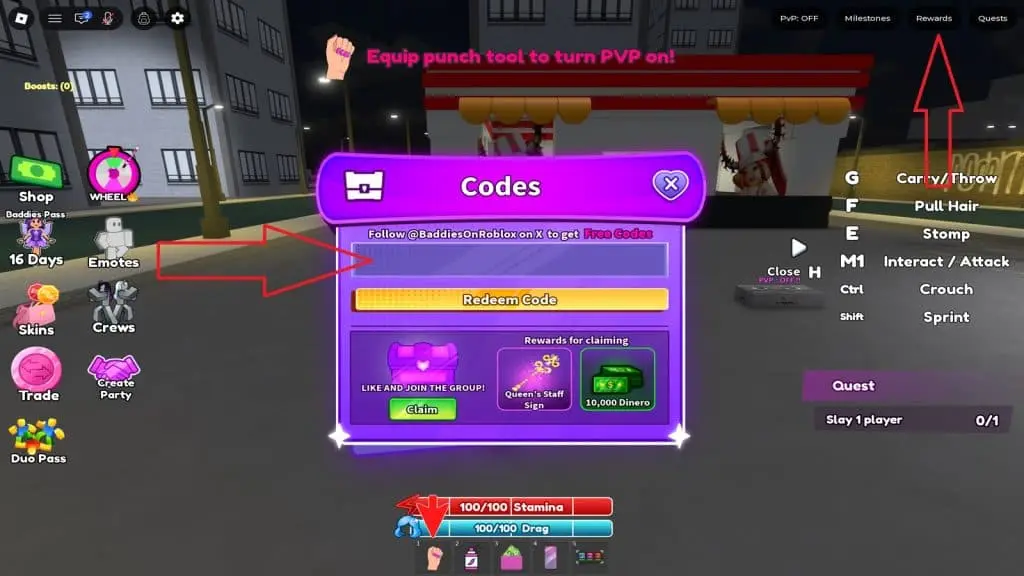
To use the codes, you just need to enter the game and connect to a server. However, it's a good idea to move to a safe spot before you start entering codes, because another player might try to block you while the code screen is open. Click the Rewards option in the top-right corner of the screen. Type a valid code into the text box at the top of the menu that opens and press the Redeem Code button. Once the process is complete, your reward is automatically added to your inventory. If you want, you can equip this look from the inventory section and use it in your next fight.
Where can I find new Baddies codes?
The most reliable way to stay informed about new codes is the game's official Discord server. Developer announcements, update notes, and community posts are made there; if you regularly check the announcement channels, you won't miss any new surprises. If you don't like using Discord, you can bookmark this page. We will continue to update the Baddies code list as new cosmetics are released. That way, you can see the most up-to-date codes in one place when you return to the game.