Current status (October 2026): the R6 Marketplace has been closed since 27 December 2025. In its official announcement of 30 June 2026, Ubisoft said the Marketplace will remain closed, that bringing it back is not only a matter of fixes but requires rebuilding key security and economic foundations, and that this is a long-term effort; it gave no reopening date. It cited account theft, botting and credit transfers as well as pricing instability as reasons. Official Rainbow Six Siege announcements published through the end of September 2026 contain no news of a reopening. The guide below describes how the Marketplace worked before it closed; the rules may change when it returns. Read more: Rainbow Six Siege economy rebuilt from scratch.
As the gaming landscape evolves and competitive free-to-play titles gain momentum, more players are diving into these experiences. One reason is that the free-to-play model encourages experimentation, often turning casual trials into deep engagements. Additionally, well-known studios invest heavily in marketing, drawing even larger audiences.
While many games offer in-game marketplaces for cosmetic items, this guide focuses specifically on the Rainbow Six Siege Marketplace. Here, you’ll find a comprehensive tutorial on navigating and utilizing the R6 Marketplace from start to finish.
What is the Rainbow Six Siege Marketplace?
The Marketplace enables players to trade various cosmetic items for in-game credits. These include:
- Weapon Skins
- Headgears
- Uniforms
- Attachment Skins
- Charms
- Operator Portraits
- Card Backgrounds
- Drone Skins
Unlike traditional in-game stores—where purchased cosmetics are permanently bound to your account—the Rainbow Six Siege Marketplace offers a dynamic trading experience. In most games, items cannot be resold, a tactic often used to maximize profits. However, R6 Marketplace breaks that mold.
Although titles like Counter-Strike 2 and Team Fortress 2 let you sell skins for real money, the Rainbow Six Marketplace operates differently. Here, you trade skins exclusively for R6 credits, maintaining a balanced cosmetic economy. This means you can offload unwanted skins for extra credits to later invest in new looks or other cosmetics. Savvy bidding may even secure you exceptional deals on rare items.
Note: In addition to mastering the R6 Marketplace, you can boost your gameplay with our network of professional boosters, ready to enhance your Rainbow Six Siege experience.
How to Sign Up for the Marketplace
If you don’t register for the Marketplace, you’ll be limited to the traditional store for purchasing cosmetics. Fortunately, Ubisoft has removed the invitation-only barrier, so you can sign up immediately. Here’s how:
- Visit the Rainbow Six Siege Marketplace and click the "Log In" button.
- If the log-in button isn’t visible, click the profile icon to access the sign-in page.
- Log in using your R6 account credentials to activate your marketplace inventory.
- Accept the terms of service and start exploring the Marketplace.
Rainbow Six Siege Marketplace Requirements
The Marketplace is accessible to all Rainbow Six Siege account holders, provided you meet a few requirements:
- You must be at least 13 years old. (Ubisoft’s age verification process is not clearly disclosed.)
- Your account must be at least level 25. If you haven’t reached level 25, you’ll need to earn XP until you qualify; otherwise, the sign-up page will indicate that you do not meet the trading requirements.
- Ensure your account is secured with two-factor authentication (2FA) and a recovery email.
How to Buy on the R6 Marketplace
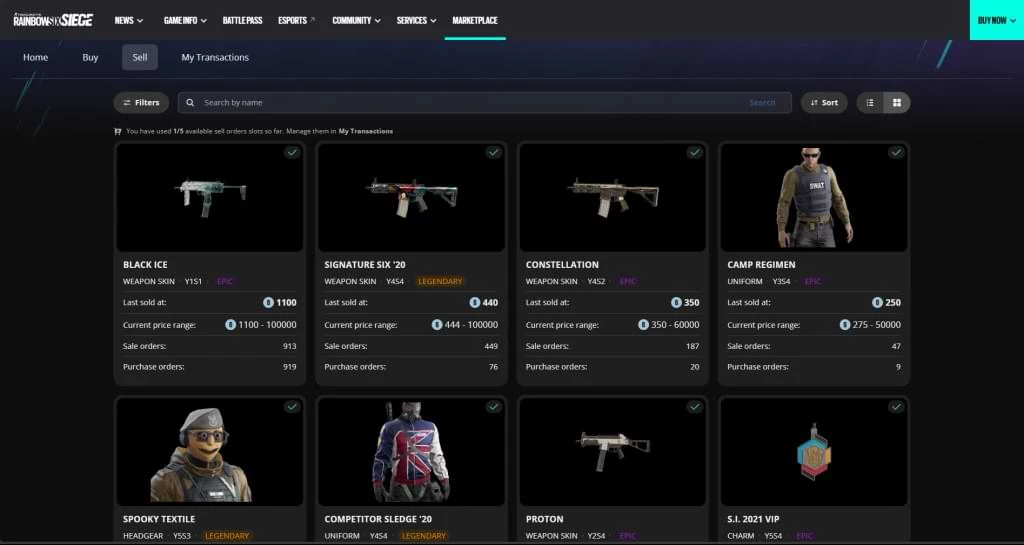
Buying on the R6 Marketplace is straightforward. If you’ve been searching for rare cosmetics or items unavailable in the Siege shop, you’ll likely find them here. Follow these steps:
- After logging in, click the "Buy" button.
- Select the desired item category.
- Search for your item by name and filter by price if needed.
- Place your bid within your budget—bidding close to the asking price can help secure the item faster.
Additionally, filter listings from low to high to spot the best deals. Always review the price history for the past 30 days to ensure your bid is competitive.
How to Sell on the R6 Marketplace
Selling on the R6 Marketplace is just as simple. Follow these steps:
- Log in to the Rainbow Six Siege Marketplace and click the "Sell" button to access your inventory.
- Select the items you wish to sell, filtering by rarity if needed.
- Set the appropriate price for your skin, and your listing will go live.
Ensure that the skins you list are in demand. Since the Marketplace operates on supply and demand, focus on popular skins—older, seasonal items may attract less interest.
R6 Marketplace Tips
Invest in Popular Operators
For a better return on your credits, consider purchasing skins for operators with high usage rates, as their cosmetics consistently remain in demand.
Use Seasonal Updates to Your Advantage
During seasonal updates, look for rare items with favorable drop rates and capitalize on them to enhance your collection.
Utilize Market Analytics
Lastly, take advantage of market analytics tools. These are invaluable for tracking skin prices, monitoring trends, and ensuring you secure the best deals.
The Positives and Flaws of the Marketplace
Every innovation comes with its pros and cons. With the Marketplace available to all players, community feedback has been pouring in. Let’s explore the strengths and weaknesses of this platform.
Positives
- Easy navigation and a streamlined process for selling skins.
- Quick access to rare items through efficient search functionality.
- Affordable pricing for buyers and flexible selling options for vendors.
Flaws
- Some users report that their full inventory isn’t displayed, preventing them from selling all desired skins.
- The absence of a fixed base price can lead to inflated skin values, with some rare items being undervalued due to fluctuating demand.
Conclusion
In conclusion, the Marketplace marks a promising beginning for Rainbow Six’s cosmetic economy. While there is room for improvement and future updates are expected, the Marketplace offers an excellent opportunity to invest in skins, as future pricing remains uncertain.
This guide covers everything from beginner tips to advanced strategies for navigating the Marketplace. We hope you find it useful. Please leave a comment below with your thoughts on the platform—we value community feedback.
FAQ’s
What is R6 Marketplace?
R6 Marketplace is a cosmetic trading platform where players can buy and sell cosmetics using in-game credits.
How to Get Accepted for the R6 Marketplace?
After enabling two-factor authentication on your R6 account, the only requirement to access the Marketplace is achieving a minimum account level of 25.
How to Use the R6 Marketplace?
Simply search "R6 Marketplace" on Google and click the first link. This will direct you to Ubisoft’s website, where you can log in with your Rainbow Six credentials to easily access the platform.
How Does Siege Marketplace Work?
Once logged in, click the "Sell" button to view all sellable items in your inventory. Select an item, set your desired price, and your listing will be live within minutes. For purchases, simply search for the item and place a competitive bid close to the asking price.
Can You Use Siege Marketplace on Console?
Yes, the Marketplace is accessible on all platforms where Rainbow Six Siege is available.
R6 Marketplace Not Working? Common Issues & Fixes
If you’re having trouble accessing the R6 Marketplace or completing a transaction, you’re not alone. Many players encounter issues ranging from login failures to bids not going through. The most common culprit is that your account hasn’t fully met the eligibility requirements—double-check that you’re at least level 25 and have two-factor authentication enabled. If everything looks fine but the page won’t load, try clearing your browser’s cache or using a different browser, as the marketplace is web-based and can occasionally have compatibility issues.
Another frequent problem is seeing only a partial inventory when you try to sell. This usually happens because not all your items are tradeable, or there’s a sync delay between your game and the marketplace. Wait a few minutes and refresh, then check if the missing items appear. If they still don’t, log out and log back in. For bid failures, it’s often due to insufficient R6 credits—make sure you have enough to cover the full asking price, not just your bid amount. Also, remember that bids are binding, so you can’t cancel them after they’ve been placed.
- Use a stable internet connection to avoid timeouts.
- Ensure your game account is linked to the correct Ubisoft profile.
- If a transaction seems stuck, wait at least 10 minutes before contacting support.
When all else fails, Ubisoft Support is the final stop. Include screenshots of the error and your account details to speed up the resolution process. Most issues are temporary and get fixed within a few hours, so don’t panic—your items and credits are safe.
R6 Marketplace Mistakes to Avoid (And How to Save Credits)
Even though the marketplace is simple to use, many players lose credits by making avoidable errors. One of the biggest mistakes is placing a bid without checking the price history. The value of skins fluctuates daily, and bidding too high on a common item means you overpay. Always look at the 30-day price trend and only bid slightly above the current lowest ask to win without wasting credits.
Another common error is selling items impulsively. Players often list their skins right after a seasonal event when the supply is high and prices are low. Instead, wait a few weeks for prices to stabilize. Also, don’t forget that the marketplace takes a small cut from each sale—this isn’t always visible upfront, so factor it into your expected profit. Setting a price that seems fair to you might be far above what others are willing to pay, leading to a listing that never sells.
Finally, many players fail to use market analytics tools. These free resources show real-time demand and price predictions, and they’re essential for making informed trades. A simple mistake like ignoring these tools can cost you hundreds of credits over time. Before you buy or sell, spend 30 seconds checking the analytics—it’s the difference between a smart investment and a wasted one.